The State Scholarship Portal (SSP) is Karnataka’s centralized digital gateway designed to ensure that financial constraints never hinder a student’s academic journey. For the 2025-26 academic cycle, the portal has streamlined the Direct Benefit Transfer (DBT) process, making it essential for applicants to sync their academic data with their Aadhaar-linked bank accounts.
ಎಸ್.ಎಸ್.ಪಿ ವಿದ್ಯಾರ್ಥಿವೇತನ 2025-26: ಅಧಿಕೃತ ಲಾಗಿನ್, ಸ್ಥಿತಿ ಪರಿಶೀಲನೆ ಮತ್ತು ಕೊನೆಯ ದಿನಾಂಕಗಳ ಮಾರ್ಗದರ್ಶಿ.
Flash Update: January 2026
- Engineering & Medical Students: The deadline for Post-Matric applications is January 31, 2026.
- OBC/Minority Departments: Portal servers are experiencing high traffic; we recommend completing e-Attestation during off-peak hours (10 PM – 7 AM).
- NPCI Alert: Ensure your bank account is “NPCI Seeded” to avoid “Payment Failed” status.

SSP Scholarship Karnataka 2026 – Quick Dashboard & Portal Overview
ಕಾರ್ಯಕ್ರಮದ ಉನ್ನತ ಮಟ್ಟದ ಸಾರಾಂಶವನ್ನು ಹುಡುಕುತ್ತಿರುವ ವಿದ್ಯಾರ್ಥಿಗಳು ಮತ್ತು ಪೋಷಕರಿಗೆ, ಈ ಕೆಳಗಿನ ಡ್ಯಾಶ್ಬೋರ್ಡ್ ಪ್ರಸ್ತುತ ವರ್ಷಕ್ಕೆ ಅಗತ್ಯವಾದ “ಒಂದು ನೋಟದಲ್ಲಿ” ವಿವರಗಳನ್ನು ಒದಗಿಸುತ್ತದೆ. ನಕಲು ಅರ್ಜಿಗಳನ್ನು ತಡೆಗಟ್ಟಲು ಮತ್ತು ಪಾರದರ್ಶಕತೆಯನ್ನು ಖಚಿತಪಡಿಸಿಕೊಳ್ಳಲು ಈ ಪೋರ್ಟಲ್ ಬಹು ವಿಭಾಗಗಳನ್ನು ಒಂದೇ ಇಂಟರ್ಫೇಸ್ಗೆ ಸಂಯೋಜಿಸುತ್ತದೆ.
| Feature | Official Details (2025-26) |
| Portal Name | State Scholarship Portal (SSP) Karnataka |
| Official Website | ssp.karnataka.gov.in |
| Launching Body | Government of Karnataka |
| Academic Levels | Pre-Matric (Class 1-10) & Post-Matric (PUC, UG, PG, PhD) |
| Primary Beneficiaries | SC, ST, OBC, Minority, and Brahmin Community Students |
| Key Requirement | SATS ID (Pre-Matric) or University Reg Number (Post-Matric) |
| Mode of Disbursement | Direct Benefit Transfer (DBT) via NPCI Mapping |
| Support Helpline | 1902 (Universal Karnataka Help Desk) |
Why the 2026 Cycle is Different (2026 ರ ಚಕ್ರ ಏಕೆ ಭಿನ್ನವಾಗಿದೆ)
ಹಿಂದಿನ ವರ್ಷಗಳಿಗಿಂತ ಭಿನ್ನವಾಗಿ, 2026 ರ ಚಕ್ರವು ದತ್ತಾಂಶ ಸಮಗ್ರತೆಗೆ ಹೆಚ್ಚಿನ ಒತ್ತು ನೀಡುತ್ತದೆ. ಪೋರ್ಟಲ್ ಈಗ ಕುಟುಂಬ (ರಾಜ್ಯ ಕುಟುಂಬ ಡೇಟಾಬೇಸ್) ನೊಂದಿಗೆ ನೈಜ-ಸಮಯದ ಮೌಲ್ಯೀಕರಣವನ್ನು ನಿರ್ವಹಿಸುತ್ತದೆ. SSP ಪೋರ್ಟಲ್ನಲ್ಲಿರುವ ನಿಮ್ಮ ಕುಟುಂಬದ ಆದಾಯ ಅಥವಾ ಜಾತಿ ವಿವರಗಳು ಕಂದಾಯ ಇಲಾಖೆಯ ಡಿಜಿಟಲ್ ದಾಖಲೆಗಳಿಗೆ ಹೊಂದಿಕೆಯಾಗದಿದ್ದರೆ, ಅರ್ಜಿಯನ್ನು ಸ್ವಯಂಚಾಲಿತವಾಗಿ “ಹಸ್ತಚಾಲಿತ ತಿದ್ದುಪಡಿ” ಗಾಗಿ ಫ್ಲ್ಯಾಗ್ ಮಾಡಲಾಗುತ್ತದೆ.
ಈ ಪರಿಶೀಲಿಸಿದ ದತ್ತಾಂಶಗಳ ಮೇಲೆ ಕೇಂದ್ರೀಕರಿಸುವ ಮೂಲಕ, ಸರ್ಕಾರವು ಕಳೆದ ವರ್ಷಕ್ಕೆ ಹೋಲಿಸಿದರೆ “ಅನುಮೋದನೆಗಾಗಿ ಕಾಯುತ್ತಿರುವ” ಕಾಯುವ ಸಮಯವನ್ನು 40% ರಷ್ಟು ಕಡಿಮೆ ಮಾಡುವ ಗುರಿಯನ್ನು ಹೊಂದಿದೆ.
SSP Scholarship 2025-26 Last Dates (Department-Wise List)
One of the biggest frustrations for students is missing a deadline due to vague information. In 2026, the Karnataka Government has implemented stricter timelines to ensure faster Direct Benefit Transfer (DBT) processing.
It is crucial to understand the distinction between the Portal Closing Date and the College Submission Deadline. While the portal might allow entries until the last date, your college nodal officer requires at least 5-7 working days prior to that to verify your e-Attestation and forward the application to the department.
| Department | Category | Pre-Matric Last Date | Post-Matric Last Date |
| Social Welfare Dept. | SC Students | Jan 15, 2026 | Jan 31, 2026 |
| Tribal Welfare Dept. | ST Students | Jan 15, 2026 | Feb 15, 2026 |
| BC Welfare Dept. | OBC (Cat-1, 2A, 3A, 3B) | March 31, 2026 | Jan 31, 2026* |
| Minority Welfare | Muslim, Sikh, Jain, etc. | Jan 31, 2026 | Jan 31, 2026 |
| Dept. of Agriculture | Raitha Vidya Nidhi | March 31, 2026 | March 31, 2026 |
ಎಂಜಿನಿಯರಿಂಗ್ ಮತ್ತು ವೈದ್ಯಕೀಯ ವಿದ್ಯಾರ್ಥಿಗಳಿಗೆ ವಿಮರ್ಶಾತ್ಮಕ ಟಿಪ್ಪಣಿ: ವೃತ್ತಿಪರ ಕೋರ್ಸ್ ಪರಿಶೀಲನೆಯು DTE (ತಾಂತ್ರಿಕ ಶಿಕ್ಷಣ ಇಲಾಖೆ) ಯಿಂದ ಸಂಕೀರ್ಣ ಶುಲ್ಕ-ರಚನಾತ್ಮಕ ಲೆಕ್ಕಪರಿಶೋಧನೆಗಳನ್ನು ಒಳಗೊಂಡಿರುತ್ತದೆ. ನೀವು ತಾಂತ್ರಿಕ ಕೋರ್ಸ್ನಲ್ಲಿ OBC ವಿದ್ಯಾರ್ಥಿಯಾಗಿದ್ದರೆ, ನಿಮ್ಮ ಕಠಿಣ ಗಡುವು ಜನವರಿ 31, 2026 ಆಗಿದೆ. ಸಾಮಾನ್ಯ ಪದವಿ ಕೋರ್ಸ್ಗಳಿಗೆ ಸಾಮಾನ್ಯವಾಗಿ ನೀಡಲಾಗುವ ಮಾರ್ಚ್ ವಿಸ್ತರಣೆಗಾಗಿ ಕಾಯಬೇಡಿ.
Eligibility & Income Criteria: Who Qualifies in 2026?
The SSP portal uses an automated eligibility engine that cross-references your Aadhaar with the Kutumba database and Revenue Department records. To avoid an immediate “Rejected by System” status, ensure you meet these specific benchmarks:
1. Annual Family Income Caps (ವಾರ್ಷಿಕ ಕುಟುಂಬ ಆದಾಯ ಮಿತಿಗಳು)
The income ceiling is the primary filter for scholarship approval. These limits apply to the combined income of both parents:
- SC/ST Students: Up to ₹2.5 Lakh per annum.
- OBC (Cat-1): Up to ₹2.5 Lakh per annum.
- OBC (2A, 3A, 3B): Up to ₹1 Lakh per annum.
- Minority Communities: Up to ₹2 Lakh per annum.
2. Academic & Attendance Requirements (ಶೈಕ್ಷಣಿಕ ಮತ್ತು ಹಾಜರಾತಿ ಅಗತ್ಯತೆಗಳು)
The government is now linking “Scholarship to Performance” to ensure funds reach active students.
- Post-Matric Students: You must have secured at least 50% marks in your previous qualifying examination.
- Pre-Matric Students: A minimum of 75% attendance is mandatory, as reported by your school via the SATS (Student Achievement Tracking System).
- Backlog Policy: Students with more than two year-backlogs in professional courses (Engineering/MBBS) may face temporary suspension of maintenance grants.
3. The “Farmers’ Child” Exception (Raitha Vidya Nidhi)
The Raitha Vidya Nidhi scheme is unique because it is not based on caste or traditional income certificates.
- Difference: Unlike other schemes, there is no specific income limit for this scholarship.
- Primary Requirement: The student’s father must be a registered farmer with a valid FRUITS ID (Farmer Registration and Unified Beneficiary Information System).
- Double Benefit: Students eligible for Raitha Vidya Nidhi can often receive this in addition to their category-based scholarship, provided they meet the separate departmental criteria.
Essential Documents for SSP Application (Pre-Matric & Post-Matric)
2026 ರಲ್ಲಿ, SSP ಪೋರ್ಟಲ್ “ಪೇಪರ್ಲೆಸ್ ವೆರಿಫಿಕೇಶನ್” ಮಾದರಿಯಲ್ಲಿ ಕಾರ್ಯನಿರ್ವಹಿಸುತ್ತದೆ. ಇದರರ್ಥ ನೀವು ಕೇವಲ ಡಾಕ್ಯುಮೆಂಟ್ನ ಫೋಟೋವನ್ನು ಅಪ್ಲೋಡ್ ಮಾಡುವುದಿಲ್ಲ; ನೀವು ಸರ್ಕಾರಿ ಸರ್ವರ್ಗಳಿಂದ ನೇರವಾಗಿ ನಿಮ್ಮ ಡೇಟಾವನ್ನು ಪಡೆಯಲು ಸಿಸ್ಟಮ್ಗೆ ಅನುಮತಿಸುವ ವಿಶಿಷ್ಟ ID ಅನ್ನು ಒದಗಿಸುತ್ತೀರಿ. ಇವುಗಳನ್ನು ಸಿದ್ಧಪಡಿಸಿಕೊಳ್ಳುವುದು ಅಪ್ಲಿಕೇಶನ್ ಘರ್ಷಣೆಯನ್ನು ಕಡಿಮೆ ಮಾಡುವ ಏಕೈಕ ಮಾರ್ಗವಾಗಿದೆ.
Mandatory Documents (Required for All)
- Aadhaar Number: Must be linked to an active mobile number for OTP verification.
- Income & Caste Certificate (RD Numbers): The 15-digit number starting with “RD” is mandatory. The system fetches your name and category directly from the Revenue Department.
- NSP OTR Number: (New for 2026) Even for state scholarships, you must now register on the National Scholarship Portal to get a One-Time Registration (OTR) number to prevent dual-benefits.
- Bank Passbook: The account must be in the student’s name (except for certain pre-matric cases).
Wait! Do You Have Your NSP OTR Number?
For the 2025-26 cycle, the SSP portal won’t let you “Final Submit” without a National Scholarship Portal (NSP) One-Time Registration (OTR) number. This is to stop students from taking two scholarships at once.
How to get it quickly:
- Step 1: Visit the NSP Portal and click on “Apply for OTR.”
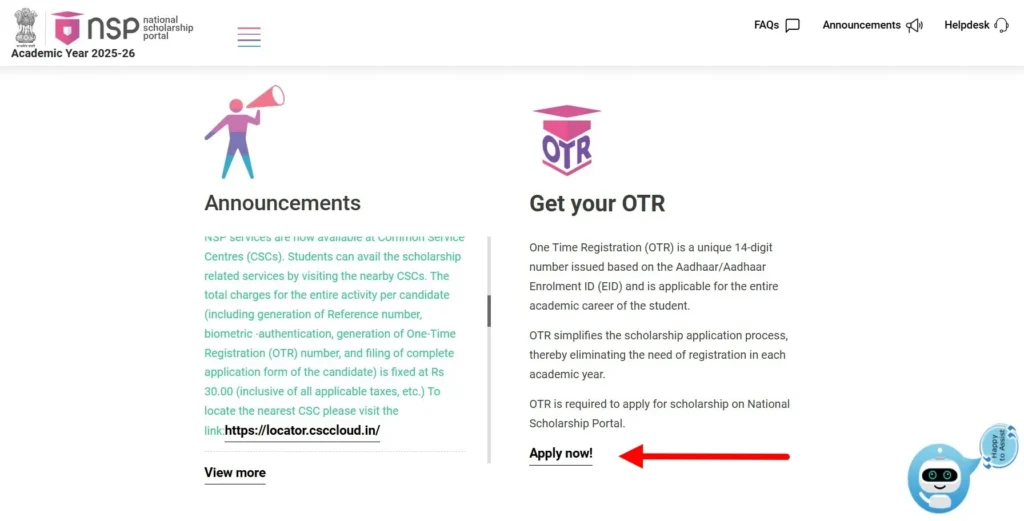
- Step 2: Use your Aadhaar-linked mobile to complete the face-authentication or OTP verification.
- Step 3: Once you get your 14-digit OTR Number (e.g., KA2025XXXXXXXX), come back to the SSP portal and enter it in the “NSP Details” section.
Course-Specific & Special Category Documents
- SATS ID (Pre-Matric): The 9-digit Student Achievement Tracking System ID is the only way for school students to pull their academic data.
- University/College Registration Number (Post-Matric): Used to verify your current enrollment and course discipline.
- UDID Number: Mandatory for students with disabilities to pull data from the Central Depository.
- FRUITS ID: Required only for children of farmers applying for the Raitha Vidya Nidhi.
- E-Attestation Number: Needed for specific documents (like hostel stay or marks cards) that are not digitally available in the state database.
ಬ್ಯಾಂಕ್ ಕ್ರೆಡಿಟ್ಗಳ ಕುರಿತು ಪರ ಸಲಹೆ: “ಲಿಂಕ್ ಮಾಡಲಾದ” ಬ್ಯಾಂಕ್ ಖಾತೆ ಸಾಕು ಎಂದು ಭಾವಿಸುವುದು ಸಾಮಾನ್ಯ ತಪ್ಪು. ನಿಮ್ಮ ಖಾತೆ NPCI-ಸೀಡೆಡ್ (ಆಧಾರ್ ಮ್ಯಾಪ್ಡ್) ಆಗಿರಬೇಕು. ನಿಮ್ಮ ಬ್ಯಾಂಕ್ ನಿಮ್ಮ ಆಧಾರ್ ಅನ್ನು DBT ಗಾಗಿ ಮ್ಯಾಪ್ ಮಾಡದಿದ್ದರೆ, ವಿದ್ಯಾರ್ಥಿವೇತನವನ್ನು ಅನುಮೋದಿಸಿದರೂ ಸಹ SSP ಪಾವತಿ ಬೌನ್ಸ್ ಆಗುತ್ತದೆ. ಅರ್ಜಿ ಸಲ್ಲಿಸುವ ಮೊದಲು BHIM ಆಧಾರ್ ಪೇ ಅಥವಾ ನಿಮ್ಮ ಬ್ಯಾಂಕಿನ ಮೊಬೈಲ್ ಅಪ್ಲಿಕೇಶನ್ ಮೂಲಕ ನಿಮ್ಮ ಸ್ಥಿತಿಯನ್ನು ಪರಿಶೀಲಿಸಿ.
Step-by-Step: How to Create an SSP Account & Login
Creating your account correctly is the foundation of a successful application. Follow these official steps on the SSP Portal (ssp.karnataka.gov.in) to ensure your ssp scholarship registration is valid for the 2025-26 cycle.
Phase 1: Creating Your New Account
- Step 1: Access the Official Portal
- Visit the official link: [ssp.karnataka.gov.in]
- Step 2: Start Registration
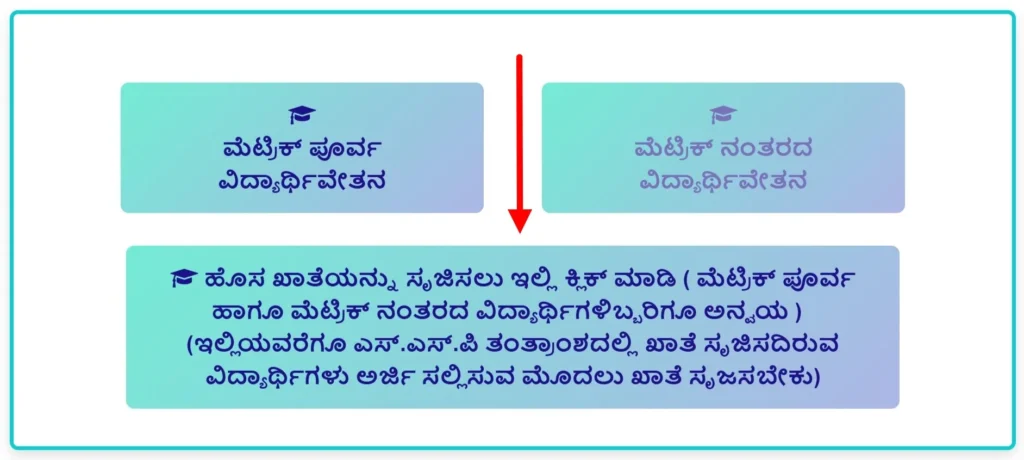
- On the homepage, click on: “ಹೊಸ ಖಾತೆಯನ್ನು ಸೃಜಿಸಲು ಇಲ್ಲಿ ಕ್ಲಿಕ್ ಮಾಡಿ (ಮೆಟ್ರಿಕ್ ಪೂರ್ವ ಹಾಗೂ ಮೆಟ್ರಿಕ್ ನಂತರದ ವಿದ್ಯಾರ್ಥಿಗಳಿಬ್ಬರಿಗೂ ಅನ್ವಯ)” (Click here to create a new account – For both Pre-Matric & Post-Matric students)
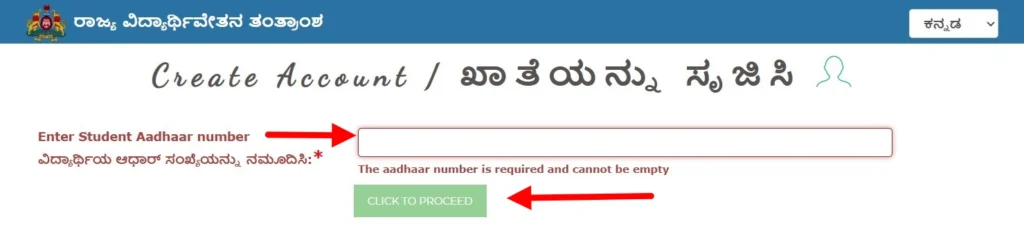
- Step 3: Aadhaar Authentication:
- Enter your Aadhaar Number & Click on “Click to Proceed”.
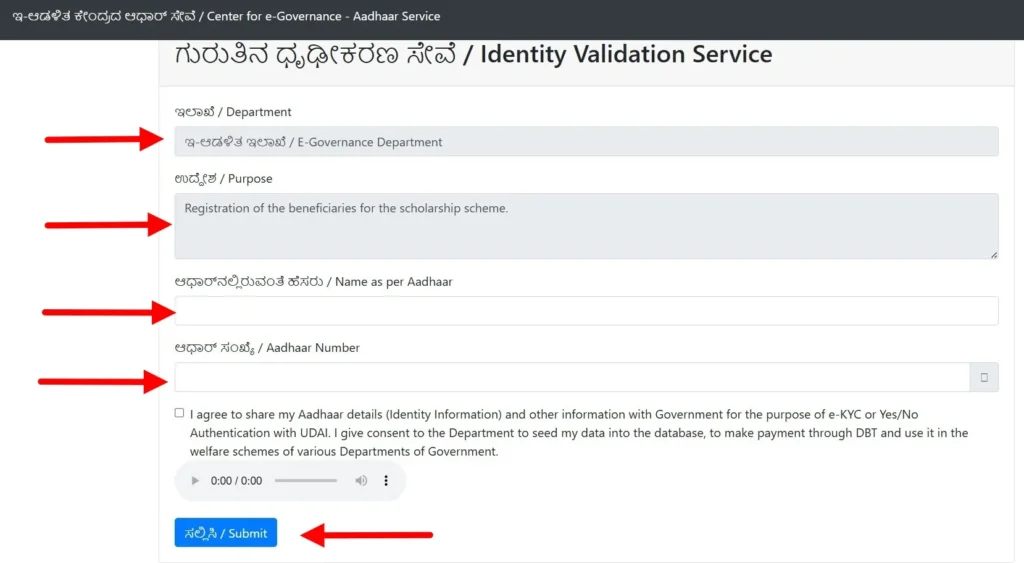
- Step 4: Identity Validation Service (E-KYC): Once you click proceed, the Identity Validation Service (ಗುರುತಿನ ಧೃಢೀಕರಣ ಸೇವೆ) page will open. You must fill in/verify these details exactly as they appear on your Aadhaar card:
- Department (ಇಲಾಖೆ): Select your respective department (e.g., Social Welfare, Tribal Welfare).
- Purpose (ಉದ್ದೇಶ): Select “SSP Scholarship Registration”.
- Name as per Aadhaar: Type your name exactly as printed on your Aadhaar card.
- Consent: Read the declaration carefully and select “Yes/Agree”. By selecting this, you agree to share your Aadhaar details with the Government for e-KYC and DBT (Direct Benefit Transfer) purposes. After this click on “Submit”.
- Step 5: Mobile OTP & Password Creation
- After clicking Submit, an OTP will be sent to your Aadhaar-linked mobile number.
- Enter the OTP to verify your identity.
- Create your Password: Choose a strong password and save it.
- Your SSP ID will be generated and sent to your mobile via SMS.
Quick Tip: I’ve found that students who take a screenshot of their SSP ID immediately have 90% fewer login issues. The SMS sometimes gets delayed, but a screenshot is forever. Ensure your “Identity Validation” screen shows a green checkmark before you hit submit.
- Important Note for Students:
- One-Time Registration: You only need to create this account once in your student life.
- Bank Linking: Ensure your Aadhaar is linked to your bank account (NPCI Seeding) to receive the scholarship amount directly into your account.
Phase 2: Setting Your Password & SSP ID
- Create a Secure Password (Step 3): The SSP system enforces strict security to protect your data. Your password must be 8-15 characters long and include:
- At least one Uppercase letter (A-Z)
- At least one Lowercase letter (a-z)
- At least one Number (0-9)
- At least one Special Character (e.g., @, #, $, %).
- Generate SSP ID: After submission, your unique SSP ID (e.g., 123456789) will be displayed on the screen and sent via SMS. Save this ID; it is permanent for your entire student life in Karnataka.
Phase 3: Official SSP Scholarship Login (The “Access” Step)
Once you have your SSP ID and your secure password, you are ready to log in. This is where you actually fill out the scholarship forms. Follow these simple steps to get inside your dashboard:
- Choose the Correct Portal: This is where most students make a mistake. The SSP has two separate login pages. You must pick the one that matches your current study level:
- Pre-Matric Login: If you are in Class 1 to Class 10.
- Post-Matric Login: If you are in PUC, ITI, Diploma, Degree, or PG courses.
- Go to the Official Site: Visit ssp.karnataka.gov.in/Home.
- Find the “Student Login” Link: On the homepage, you will see a prominent menu. Click on “Student Login”.

- Also, if you are a Post-Matric student, you can go directly to the dedicated login page at ssp.postmatric.karnataka.gov.in.
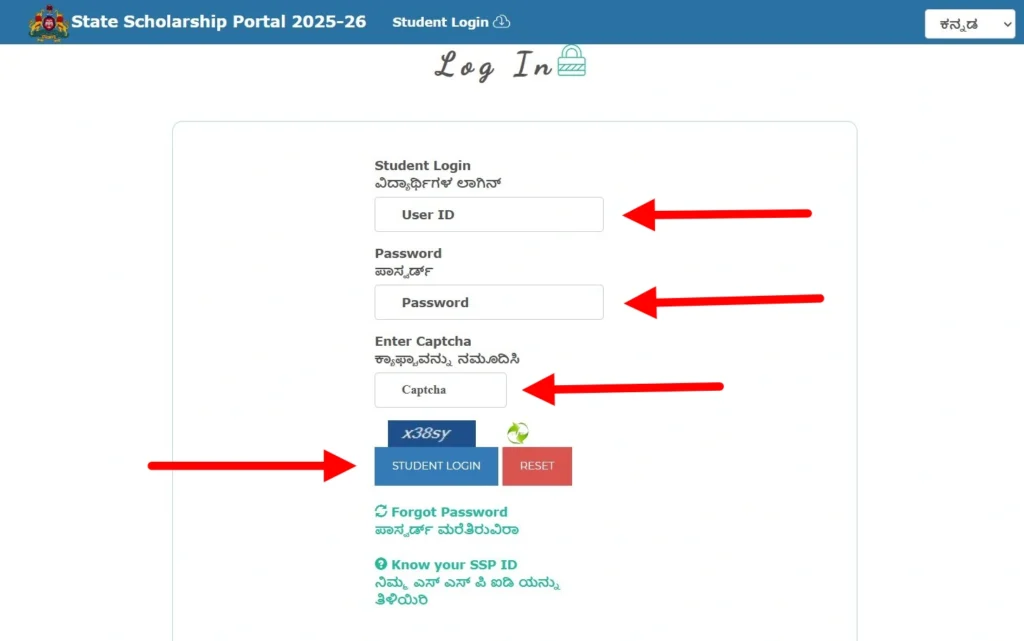
- Enter Your Credentials:
- User ID: Enter the SSP ID you received via SMS (e.g., 192021XXXX).
- Password: Type the strong password you created during registration (the one with the special character and capital letter).
- Solve the Captcha: You will see a small box with random letters or numbers (Captcha). Type those exactly as they appear into the empty text box.
- Click “Login”: Once you click the button, you will be taken to your 2025-26 Student Dashboard.
ತಜ್ಞರ ಸಲಹೆ: ಪುಟ ಲೋಡ್ ಆಗದಿದ್ದರೆ, ಕ್ಲಿಕ್ ಮಾಡುತ್ತಲೇ ಇರಬೇಡಿ. ಪುಟವನ್ನು ರಿಫ್ರೆಶ್ ಮಾಡಿ ಅಥವಾ ನಿಮ್ಮ ಬ್ರೌಸರ್ ಸಂಗ್ರಹವನ್ನು ತೆರವುಗೊಳಿಸಿ. 2026 ರಲ್ಲಿ, ಪೋರ್ಟಲ್ ಹೆಚ್ಚು ವೇಗವಾಗಿರುತ್ತದೆ, ಆದರೆ “ಕೊನೆಯ ದಿನಾಂಕ” ರಶ್ ಸಮಯದಲ್ಲಿ, ಸರ್ವರ್ ಇನ್ನೂ ಭಾರವಾಗಬಹುದು.
Guide to E-KYC and E-Attestation Process (Post-Matric)
In 2026, E-Attestation is the digital bridge between your physical documents and the SSP portal. It is a mandatory step for Post-Matric students (except PUC and ITI in most cases) to verify that their uploaded documents are genuine.
1. Completing E-KYC (Aadhaar Consent)
Before applying, you must complete E-KYC on the main SSP portal.
- The Process: Log in, click on “Aadhaar E-KYC,” and provide your consent to fetch your photo and demographic data.
- Why it fails: If your photo is not updated in the Aadhaar database, the system may reject your E-KYC. Visit a nearby Aadhaar Seva Kendra if your biometric data is outdated.
2. The E-Attestation Workflow
You must visit the dedicated sub-portal: eattestation.ssp.karnataka.gov.in.
- Step 1: Log in using your SSP ID and Aadhaar details.
- Step 2: Upload high-quality PDF scans of documents that aren’t digitally verified (e.g., Study Certificate, Hostel Stay, or non-Karnataka Marks Cards).
- Step 3: The Nodal Officer Role: Once uploaded, your documents go to your college’s Nodal Officer. They are responsible for checking your physical records against the digital upload.
- Step 4: Tracking Approval: On the E-Attestation dashboard, check the “Status” column. Only after it says “Approved” will you receive an E-Attestation ID, which you must then enter into your main SSP application.
How to Apply for SSP Scholarship 2025-26 (Fresh & Renewal)
The 2026 application process is strictly data-driven. Also, remember that you must have your NSP OTR (National Scholarship Portal One-Time Registration) number ready before you hit submit on the SSP portal.
Pre-Matric Application Process (Class 1-10)
For school students, the process is streamlined via the SATS (Student Achievement Tracking System).
- Login: Access the Pre-Matric portal at ssp.karnataka.gov.in.
- SATS Integration: Enter your 9-digit SATS ID. The system will automatically pull your school name, class, and father’s name.
- Income/Caste Verification: Enter the RD numbers for your certificates. Also, provide your parent’s Aadhaar for consent.
- Submit: Review the auto-populated data. If correct, click “Final Submit” and save the acknowledgment.
Post-Matric Application Process (Diploma, Engineering, PG)
Professional course students must be meticulous with their “Fee Details.”
- Login: Access the Post-Matric dashboard.
- Course Info: Enter your University/College Registration number.
- Enter IDs: Input your E-Attestation IDs and your NSP OTR Number.
- Hostel Details: If staying in a government or private hostel, enter the details to claim the Maintenance Allowance.
- Finalize: Cross-check your bank account seeding status before clicking “Submit.”
Renewal Process: The “One-Click” Method
If you received the scholarship last year, your 2026 renewal is much faster.
- How it works: Log in with your existing SSP ID. The system will ask, “Do you want to renew your application for 2025-26?”
- What to Update: You only need to update your current year’s fee receipt and previous year’s marks.
- One-Click Submission: If your bank and Aadhaar details haven’t changed, the “Renewal” button allows you to skip the entire registration phase, saving you from server lag.
Check SSP Payment Status 2026: Interpreting DBT Codes
Checking your ssp payment status is the most frequent activity on the portal. To provide a real-world guide, I visited the portal to verify the exact path. Also, remember that payment is a multi-stage process involving the State Treasury and the NPCI gateway.
Real Steps to Check Your Status:
- Visit the Official Site: Go to [ssp.karnataka.gov.in/Home].
- Access the Dashboard: Click on “Student Login” and enter your credentials.
- Find the Report: On your home screen, look for the sidebar menu and click on “Year Wise Student Status”.
- Select Academic Year: Choose ‘2025-26’ and click the ‘View’ button.
- Read the Table: A detailed grid will appear showing your Department, Scheme, and DBT Status.
What Do These Status Codes Actually Mean?
- Awaited: Your application is approved, but the system is currently verifying if your bank account is active and NPCI-linked. No action is needed yet.
- Push to DBT: This is the most positive sign. Your file has been sent to the electronic payment gateway. Money usually hits your account within 3-5 working days.
- Sent to Treasury: The government has officially released the funds for your specific application. The delay now lies with the banking system.
- Rejected by Bank: This is a red flag. It almost always means your Aadhaar is not seeded or your account is dormant. You must visit your bank immediately.
Troubleshooting: Why Your SSP Scholarship Was Rejected & How to Fix It
If your post matric ssp scholarship status check shows a “Rejected” or “Returned” remark, don’t panic. Most issues are data mismatches that can be corrected manually.
| Error Message | Why it Happened | How to Fix It |
| Income Mismatch | The income on your SSP form doesn’t match the Revenue Dept’s digital RD record. | Visit the Taluk Social Welfare Office with your original physical Income Certificate to update the portal data. |
| Aadhaar Discrepancy | Your name/gender on Aadhaar is different from your SSLC or SATS records. | Update your Aadhaar at a K-Two / Aadhaar Seva Kendra to match your school documents. |
| SATS Data Error | Your school hasn’t updated your current year’s promotion status in the SATS database. | Contact your School Headmaster or Nodal Officer; this cannot be fixed by the student. |
| NPCI Mapping Failed | Your bank account is not linked to the Aadhaar payment bridge. | Visit your Bank Branch and submit the “DBT Consent / NPCI Mapping Form.” |
Official SSP Scholarship Helpline & Departmental Contacts
For unresolved technical issues, contacting the correct department is vital. The 1902 Universal Helpline is the primary contact, but specific departmental desks are often more effective for payment queries.
| Department Name | Contact Number | Official Email ID |
| SSP Universal Helpline | 1902 | [email protected] |
| Social Welfare (SC) | 9482300400 | [email protected] |
| Backward Classes (OBC) | 8050770004 | [email protected] |
| Minority Welfare | 8277799990 | [email protected] |
| Tribal Welfare (ST) | 9482300400 | [email protected] |
ತಜ್ಞರ ಟಿಪ್ಪಣಿ: ಕರೆ ಮಾಡುವಾಗ, ಯಾವಾಗಲೂ ನಿಮ್ಮ SSP ID ಮತ್ತು ಆಧಾರ್ ಸಂಖ್ಯೆಯನ್ನು ಸಿದ್ಧವಾಗಿಡಿ. ನಿಮ್ಮ 2026 ರ ಫೈಲ್ ಸ್ಥಿತಿಯನ್ನು ಪಡೆಯಲು ನಿರ್ವಾಹಕರು ಇವುಗಳನ್ನು ಕೇಳುತ್ತಾರೆ.
Quick Answers to Common SSP Problems
Can Engineering students apply for both NSP and SSP?
Yes, you can apply for both, but you cannot keep both. If you get selected for an NSP scholarship (like the National Merit) and an SSP scholarship, the system will eventually flag the duplicate. You’ll have to choose the one that gives you more money. Important: For 2026, you must get an NSP OTR Number first, or the SSP portal won’t let you submit your application.
What is the last date for OBC SSP Scholarship?
For Engineering, Medical, and Degree (Post-Matric) students, the deadline is January 31, 2026. Don’t wait for an extension—OBC funds are limited and processed on a first-come, first-served basis. For school students (Pre-Matric), you have until March 31, 2026.
How do I fix “NPCI Mapping Failed”?
This isn’t a portal glitch; it’s a bank issue. Your scholarship money is sent via Aadhaar, not your account number.
Go to your bank branch physically.
Ask for the “NPCI Seeding Form” (also called the DBT Consent form).
Once the bank staff links your Aadhaar to the NPCI mapper, it takes about 4 to 5 days for the “Failed” status on the SSP site to turn into “Success.”
Does a student need their own bank account?
If you are in Class 1 to 10, your scholarship can go into a joint account with your parents. But if you are in PUC, Degree, or Diploma, you must have your own individual savings account. If you are still using a “Minor Account” but have turned 18, go to the bank and convert it to a “Regular/Major Account,” or your payment will fail.